
To install Python on windows, follow the below instructions:
- Go to Python’s Windows download page
- In the list, find the executable installer that is suitable for your local machine e.g. x64, x86
- Wait for the download to complete and run the .exe installer.
- Install Python, but for easiness, modify the install location to something like.
C:\Python37-32This isn’t a must but personally, it makes accessing it easier. - After the install is complete, it’s time to set up some environment variables for shortcut access to Python & pip via the command prompt.
- Go to Control Panel, then System, then Advanced System Properties.
- Click the Advanced tab and click the Environment Variable button.
- Add the following two values to your PATH variable (Or replace with the path you installed the Python files)
C:\Python37-32C:\Python37-32\Scripts
- Click the Ok button until all is closed, now both the python.exe and pip.exe executable will be accessible.
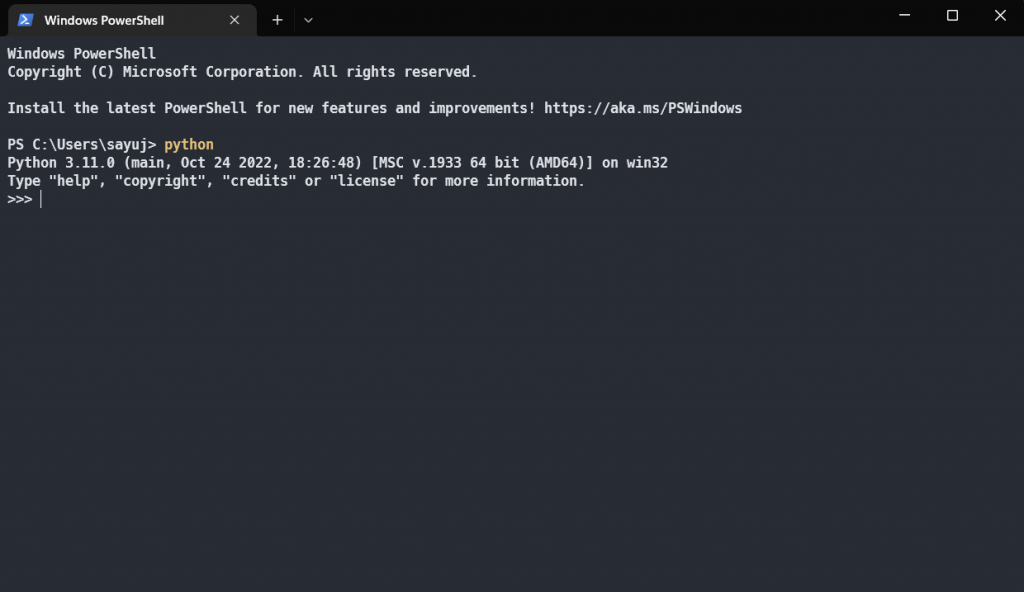
- Open the command prompt and simply type.
pythonSee Figure 1 for an example of what should be present after the command. If it’s not similar to Figure 1, then use the following in-depth link to install python on windows again.

This is my first time pay a quick visit at here and i am really happy to read everthing at one place
Durable and reliable!
This was beautiful Admin. Thank you for your reflections.
I very delighted to find this internet site on bing, just what I was searching for as well saved to fav
Pretty! This has been a really wonderful post. Many thanks for providing these details.
This was beautiful Admin. Thank you for your reflections.
Pretty! This has been a really wonderful post. Many thanks for providing these details.
Great mix of research and practical application. Very helpful.
Well-written and practical. Can you share a template for this?
Great FAQ section — answered the exact questions I had.
The examples were spot on. Can you post more like this?
This blog is such a hidden gem I stumbled upon it by chance and now I’m completely hooked!
Could you expand on the third tip? I’d love to know more.
Awesome write-up! The screenshots made everything so clear.
Well-written and insightful. Would love to see case studies next.
Thanks for the helpful checklist — it made planning simpler.
I love the practical tips in this post. Can you recommend further reading?
Useful tips and friendly tone — a winning combination. Thanks!
I am truly thankful to the owner of this web site who has shared this fantastic piece of writing at at this place.
Well-written and insightful. Would love to see case studies next.
Very well presented. Every quote was awesome and thanks for sharing the content. Keep sharing and keep motivating others.
For the reason that the admin of this site is working, no uncertainty very quickly it will be renowned, due to its quality contents.
I like the efforts you have put in this, regards for all the great content.
I’m often to blogging and i really appreciate your content. The article has actually peaks my interest. I’m going to bookmark your web site and maintain checking for brand spanking new information.
You’re so awesome! I don’t believe I have read a single thing like that before. So great to find someone with some original thoughts on this topic. Really.. thank you for starting this up. This website is something that is needed on the internet, someone with a little originality!
Pretty! This has been a really wonderful post. Many thanks for providing these details.
Pretty! This has been a really wonderful post. Many thanks for providing these details.
This is really interesting, You’re a very skilled blogger. I’ve joined your feed and look forward to seeking more of your magnificent post. Also, I’ve shared your site in my social networks!
Very well presented. Every quote was awesome and thanks for sharing the content. Keep sharing and keep motivating others.
naturally like your web site however you need to take a look at the spelling on several of your posts. A number of them are rife with spelling problems and I find it very bothersome to tell the truth on the other hand I will surely come again again.
This was beautiful Admin. Thank you for your reflections.
This is really interesting, You’re a very skilled blogger. I’ve joined your feed and look forward to seeking more of your magnificent post. Also, I’ve shared your site in my social networks!
Hi there to all, for the reason that I am genuinely keen of reading this website’s post to be updated on a regular basis. It carries pleasant stuff.
very informative articles or reviews at this time.
For the reason that the admin of this site is working, no uncertainty very quickly it will be renowned, due to its quality contents.
Have any favorite blog posts or writers? Share them with us in the comments!
I truly appreciate your technique of writing a blog. I added it to my bookmark site list and will
I just like the helpful information you provide in your articles
thank you sir
I do not even understand how I ended up here, but I assumed this publish used to be great
Clear examples made a big difference. Thanks!
This is my first time pay a quick visit at here and i am really happy to read everthing at one place
Awesome! Its genuinely remarkable post, I have got much clear idea regarding from this post
Hi there to all, for the reason that I am genuinely keen of reading this website’s post to be updated on a regular basis. It carries pleasant stuff.
You’re so awesome! I don’t believe I have read a single thing like that before. So great to find someone with some original thoughts on this topic. Really.. thank you for starting this up. This website is something that is needed on the internet, someone with a little originality!
Thank you for the great experience, everything worked smoothly.
Thank you for the well-organized system.
We truly appreciate your support and kind words.
Thank you for your support and trust in us.
Thank you for your trust and support!
Thank you for your trust and support!
Many thanks for your thoughtful comment!
This was exactly what I needed today, thanks for sharing.